

DIZO Watch 2 Sports i (Blue Strap, Free Size)
Price: Not Available
Currently Unavailable
Highlights
- Touchscreen
- Fitness & Outdoor
Description
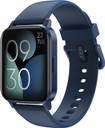
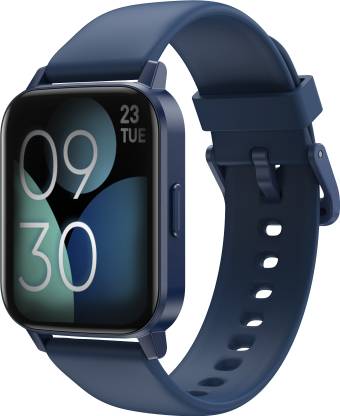
Designed with a 4.3 cm (1.69) full-touch display, the DIZO Watch 2 Smartwatch is convenient to use. Its 600 nits bright screen allows you to have a clear view even when you are out in the sun. Made from sturdy zinc alloy, the middle frame of this smartwatch is robust. Furthermore, this smartwatch is topped with a 2.5 D curved glass that gives it a polished look and keeps it safe from scratches and dents.
Read More
Specifications
Fitness And Watch Functions
| Calorie Count |
|
| Step Count |
|
| Heart Rate Monitor |
|
In The Box
| Sales Package |
|
General
| Model Number |
|
| Model Name |
|
| Dial Shape |
|
| Strap Color |
|
| Strap Material |
|
| Size |
|
| Touchscreen |
|
| Water Resistant |
|
| Usage |
|
| Ideal For |
|
| Compatible OS |
|
| Brand Strap Color |
|
Camera And Display Features
| Display Resolution |
|
| Display Size |
|
Additional Features
| Advanced Features |
|
| Key Features |
|
| Other Features |
|
Audio And Video Features
| Voice Control |
|
Product Details
| Brand Color |
|
| Sensor |
|
| Notification |
|
| Notification Type |
|
| Battery Type |
|
| Charge Time |
|
| Battery Life |
|
| Rechargeable Battery |
|
| Charger Type |
|
| Sim Slot Present |
|
| Voice Caling |
|
| Multi-touch |
|
Connectivity Features
| Call Function |
|
| Bluetooth |
|
| Wi-Fi |
|
| GPS |
|
| Messaging Support |
|
| Email Support |
|
Ratings & Reviews
3.6
★
132 Ratings &
6 Reviews
- 5★
- 4★
- 3★
- 2★
- 1★
- 67
- 16
- 7
- 12
- 30
4
Wonderful
Worth
READ MOREMahesh Acharya
Certified Buyer, Uttara Kannada District
Feb, 2023
7
1
Report Abuse
4
Delightful
Good
READ MOREFlipkart Customer
Certified Buyer, Hyderabad
Jul, 2022
22
12
Report Abuse
5
Nice product
His good
READ MOREFlipkart Customer
Certified Buyer, Baran
Jan, 2023
17
8
Report Abuse
3
Nice
Waste company of Flipkart
READ MOREbhavana Ch
Certified Buyer, Hyderabad
May, 2023
1
0
Report Abuse
5
Just wow!
Good product 👍 very nice quality is best
READ MOREKarmvir Yadav
Certified Buyer, Surat
Oct, 2024
0
0
Report Abuse
4
Worth the money
I like this watch
READ MOREDawa lhamu Tamang
Certified Buyer, Gangtok
Aug, 2023
0
1
Report Abuse
+
All 6 reviews
Questions and Answers

Q:Why is the data not synchronized?
A:1 Watch and DIZO app must be connected when you're exercising or monitoring. 2 After finishing it, pull down the home page of DIZO app to refresh. 3 Try switch the BT on and off or restart the app.
RetailNet
Flipkart Seller208
50
Report Abuse
Q:How do I restore the factory settings of my Watch?
A:1 Open DIZO APP, click the device icon on the ME page, and click Reset Factory Settings. 2 Open DIZO Watch 2 Sports, go to setting, click System, and select Reset. Note: The device will reset all data
RetailNet
Flipkart Seller228
56
Report Abuse
Q:We change the strap or not what is the size of strap
A:strap are changble with 22mm size
Flipkart Customer
Certified Buyer23
4
Report Abuse
Q:How do I connect my DIZO Watch 2 Sports ?
A:1 Hold the power key for 3s to turn on the watch and Select language. 2 Turn on phone's BT. 3 Download the DIZO app and login it, Scan QR code with DIZO APP. 4 When receive binding request, click "?".
RetailNet
Flipkart Seller22
2
Report Abuse
Q:How long can we hold it under water ?
A:approx 50-60 min
Prince Sahu
Certified Buyer9
1
Report Abuse
Q:What systems is DIZO APP compatible with?
A:DIZO APP can support mobile devices with Android 5.0 or above/iOS 10.0 or above.
RetailNet
Flipkart Seller9
1
Report Abuse
Q:How to set the message notification and call notification of the watch?
A:Open the DIZO app and find the Notification and Call Reminder in the Me page. Click on it to open the app notifications. (Note: Turn on phone and message notification permissions in phone.)
RetailNet
Flipkart Seller12
5
Report Abuse
Q:What is starp size ?
A:22 mm
Kaustuv Das
Certified Buyer4
0
Report Abuse
Q:workout records are not capturing
A:1 Exercise duration should longer than 5 minutes, distance greater than 0.1km or calories greater than 5 kcal. 2 After finish exercising, please refresh the DIZO app homepage several times to sync.
RetailNet
Flipkart Seller10
3
Report Abuse
Q:Does DIZO Watch 2 Sports support Realme link? Can it be associated with Google fit?
A:1. Currently, does not support with google fit. 2. DIZO Watch 2 Sport does not support with realme link and the subsequent launch of new watches will also be associated with DIZO app.
RetailNet
Flipkart Seller8
2
Report Abuse
Safe and Secure Payments.Easy returns.100% Authentic products.
Back to top