

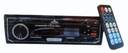
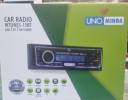
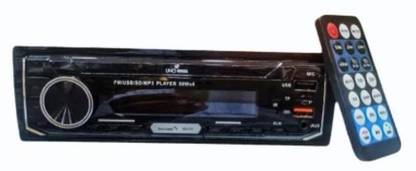
Unominda Uno 001 MP3 Car FM Modulator (Black, Brown Bluetooth Included)
Price: Not Available
Currently Unavailable
Description
1.SD/MMC/USB/MP3 compatible play system
9.3/RPT: During radio mode, brief press to choose number 3 preset station. During playback mode, press to repeat.
10.4/RDM: During radio mode, brief press to choose number 4 preset station. During playback mode, press to random play.
11.5/10-: During radio mode, brief press to choose number 5 preset station. During playback mode, press to jump to previous 10 songs.
12.6/10+: During radio mode, brief press to choose number 6 preset station. During playback mode, press to next 10 song.
13. VOL: Volume control. During playback mode, brief press to activate EQ setting, rotate volume knob to choose each preset EQ.
5.Real-time clock function
6.LCD display
7.High power output
Support big capability mobile hard disk play function
2. 3. Total figure radio tuning system
4. Electronic volume control
Basic operations:
Installation And Removing This unit is designed to prevent the thieves, please fix carefully follow
the process of installation.
Press the curving lock sheath of the unit, put
the sheath into dashboard, and then push the
unit into the sheath till it was locked. But sure that the unit is installed in an appropriate situation, so that the drivers can control the car
Installation
normally and prevent the car from braking suddenly the passenger will be hurt.
Notice
1. Before the unit installation, please check the power output and check
that if the unit works normally. 2. Please use the accessory we offered only, or else beget needless fabric of the car, please call your seller.
breakage. If you need to alter the
Removing
8.RCA line out RCA
1./MUT : Long press this button to power on and mute, short press to
power off.
2.MOD: press this button to choose different mode. FM-USB-SD-BT-AUX 3. During radio mode, brief press this button to auto-search stations
forward, long press to manual search station forward. During playback mode., short press to play previous song, long press to go fast forward.
In Bluetooth station, brief press to answer the phone.
4.144 During radio mode, brief press this button to auto-search stations backward, long press to manual search station backward. During playback mode., brief press to play previous song, long pressto go fast backward. In Bluetooth station, brief press to hang up the phone.
5.CLK: Brief press to display clock, long press to enter clock setting, using volume knob to adjust clock setting. 6.BND: Brief press to switch band range, long press to store stations.
7.1/ During radio mode, brief press to choose number 1 preset stations. During playback mode, brief press to pause, press again to play.
8.2/INT: During radio mode, brief press to choose number 2 preset station. During playback mode, press to brief play each song for first 10 seconds.
Put the keys given into the keyholes on the two sides of the unit, until the lock is unlocked, then remove the unit with the keys.
Read More
Specifications
In The Box
| Sales Package |
|
General
| Brand |
|
| Model Number |
|
| Bluetooth Included |
|
| Bluetooth Version |
|
| File Format Supported |
|
| Color |
|
| Internal Memory |
|
| Remote Control Included |
|
Music And Sound Features
| Audio Format Supported |
|
| Music Memory Capacity |
|
| Frequency Response |
|
Dimensions
| Width |
|
| Height |
|
| Weight |
|
Be the first to ask about this product
Safe and Secure Payments.Easy returns.100% Authentic products.
Back to top